Redeem codes
Redeeming a code in Creatures of Sonaria is a four-step job — open the redeem tile in the in-game menu, type the code, submit it, and read the result. This walkthrough shows the exact tiles and fields with in-game screenshots, explains why a valid-looking code fails, and lists where new codes actually get posted.
Find the redeem window in game
The redeem window is not in the shop. It opens from the in-game menu's bottom icon row, from the leftmost tile — the one showing a gift box with a star above it. That row is the main hub: the tiles beside it open tasks, the event shop, the creature shop, the store, polls, storage, social, and settings.
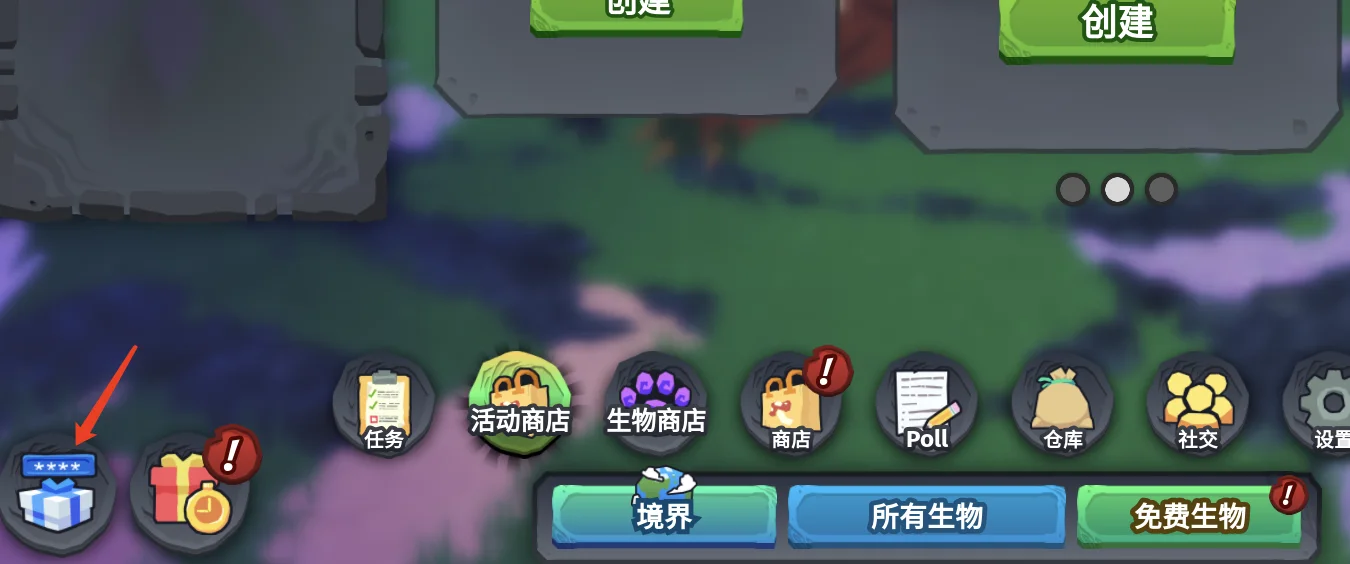
- Look for the starred gift box, not a shop bag or a paw: those open stores instead.
- The row is part of the main in-game UI, so close any open panel first if the row is hidden.
- On touch layouts the row can wrap or scroll horizontally — pan the row before concluding the tile is missing.
No other menu in the game redeems codes. If you are searching the shop, the store, or settings, you are in the wrong place.
Enter the code and submit it
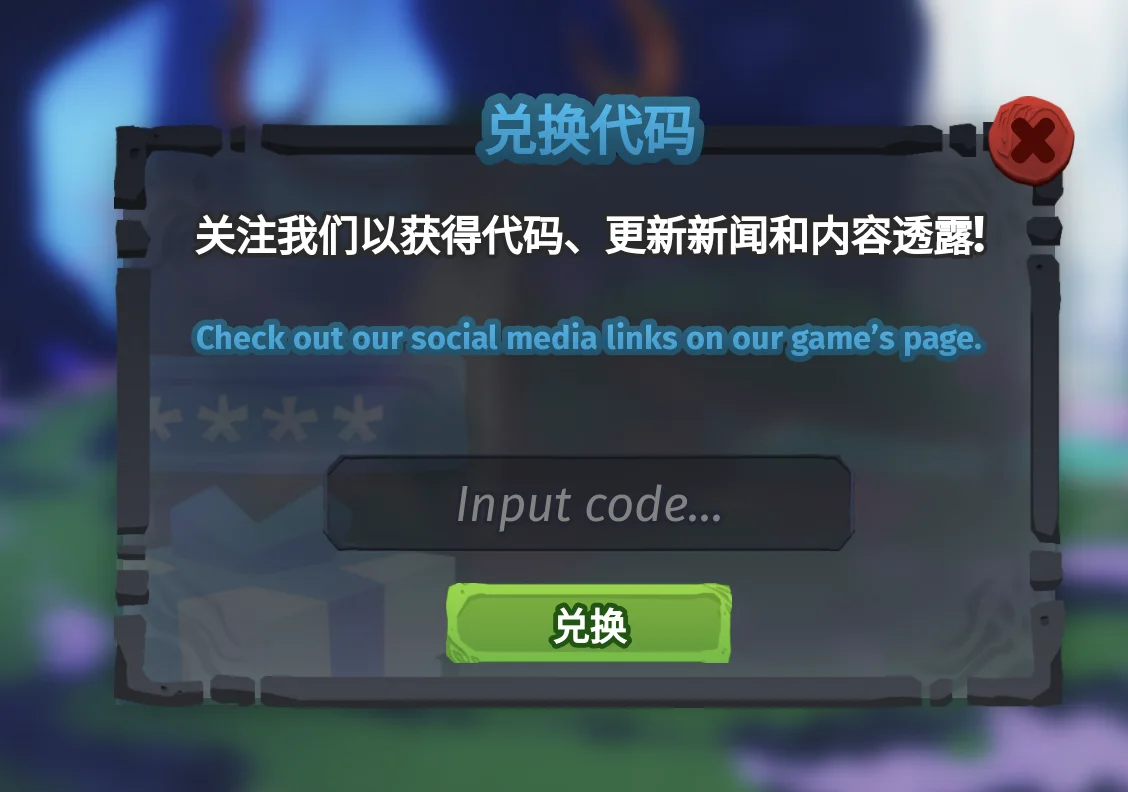
Selecting the redeem tile opens a window with a single field. That field takes one code at a time, and the window itself tells you where the game posts new ones — which is worth reading once, because it points at the official social links where codes are announced.
- 1
Select the code field
It is the wide field in the middle of the window, labelled "Input code…".
- 2
Paste the code exactly
Codes are case-sensitive, so COSYEAR5 and cosyear5 are different inputs. Remove any leading or trailing space.
- 3
Press the green button
The green button under the field submits the single code in the field.
- 4
Check what you gained
A working code pays out immediately. The reward goes to your inventory or currency, not to the redeem window.
The most common reason a genuinely valid code fails is capitalization. Copy the code from the list you are reading and paste it — do not retype it from memory or from a video's on-screen text.
Work out why a code failed
| What happens | Most likely cause | What to do |
|---|---|---|
| An error appears after you submit | The code is expired, already redeemed on this account, or mistyped | Paste the exact text once more; if it still fails, treat the code as dead instead of trying spelling variants |
| Nothing happens at all | The field was empty, or the code went in with a trailing space | Clear the field, paste once, and submit again |
| It works for a friend but not for you | Codes are single-use per account | Ask when and where they got it; a code spread through a video or a Discord post is usually already claimed |
| It worked earlier and fails now | The event window that issued the code has closed | Check the dated list on this site's codes page before assuming the code is still valid |
The reward text for each code on this site is the historical reward — useful for identifying old lists, not a promise that the code still pays out.
This site's rule is deliberately strict: a code is listed as active only after it redeems in the current experience. Everything else is recorded as expired, including codes that third-party trackers still publish as working.
Worked example: COSYEAR5
COSYEAR5 is why this site tests instead of copying. Third-party code lists still publish it as the working code for Creatures of Sonaria, and the tracker this site cross-checks was revised on September 17, 2026 — but a redemption test in the current experience on October 18, 2026 no longer accepts it. The code is kept in the expired table so that you can immediately tell which list you are reading has gone stale.
- A code list is only as fresh as its last in-game test, whatever date it prints at the top.
- When a list and the game disagree, the game is the source of truth.
- If a page still shows COSYEAR5 as active, it has not been re-tested recently — treat its other claims the same way.
Where new codes are actually posted
- The in-game announcement panel and the redeem window's own hint, which points at the game's official social links.
- The official Discord's announcement channels, where event codes usually appear first.
- The game's official social accounts, which post celebration and milestone codes.
- This site's codes page, which records each code's status with the date it was last checked.
If a site, a tool, or a player asks you to log in, hand over a creature, or trade first to "activate" a code, it is a scam. Codes go into one place only: the field shown above.
A ten-second routine that saves wasted codes
- 1
Copy, do not retype
Copy the code straight from the source so capitalization and length are exact.
- 2
Check the edges
Make sure no space came along with the paste.
- 3
Submit once and read the result
Retrying with different capitalization cannot fix an expired code; it only wastes time.
- 4
Blame the source, not the game
If a code fails, drop the page that published it — a dated source is the only one worth keeping.
Field checklist
Redeem window open
You are at the leftmost tile of the in-game bottom icon row — not in the shop or the settings menu.
Exact text
The code is pasted, the capitalization matches, and there are no leading or trailing spaces.
Submitted once
You submitted once and read the result instead of retrying spelling variants.
Source is dated
The page you copied from shows a check date, and it agrees with this site's code list.
Sources & verification
The factual foundation below comes from the official Roblox listing, the official community wiki, and dated creator material. Every table quotes its source and snapshot date; anything not yet confirmed in the current patch is labeled as observed or pending instead of guessed.
Creatures of Sonaria Codes (official wiki)
Code names, rewards, and the historical active/expired split cross-checked against this site's list.
Creatures of Sonaria codes (third-party tracker)
Second reference for the current code list and its revision date; used to cross-check status before testing in game.
Roblox experience listing
Confirms the experience the redeem window and its screenshots were taken in.
Official Discord announcements
Where event codes and redemption notices are announced first.
Sources checked October 18, 2026. Recheck in the current experience after a balance, environment, or controls change.
Continue exploring
FAQ
Where is the redeem code button in Creatures of Sonaria?
It is the leftmost tile in the bottom icon row of the main in-game menu, the one with a starred gift box on it. Selecting it opens a window with a field labelled "Input code…" and a green button underneath. The shop, the store, and the settings menu do not contain a redeem field.
Why is my code not working?
Three causes cover almost every failure: the capitalization or spacing does not match, the code was already redeemed on that account, or the code has expired since the list you read was written. Paste the code from its source rather than retyping it, and check the date on that source before assuming the game is at fault.
Is COSYEAR5 still active?
No. COSYEAR5 was tested in the current experience on October 18, 2026 and no longer redeems, even though some code lists still publish it as the working code. It is kept in this site's expired table so you can tell immediately that a page showing it as active has not been re-tested.
Can I redeem the same code twice?
No. Codes are single-use per account. That is also why a code that works for a friend can fail for you — a code circulating in a video or a Discord message is usually already claimed or already closed.
Do codes expire?
Yes. Event codes are tied to the window of their event and stop working when it closes, and celebration or milestone codes are disabled later without notice. This site marks every code expired until an in-game test confirms otherwise.